Search engine optimization (SEO) is a multifaceted discipline that spans content creation, site performance, backlink building, and technical architecture. While webmasters dedicate significant resources to keyword research and core web vitals, one crucial element is frequently overlooked: the structure of their URLs and the design of their slugs.
A website’s URL structure is the foundational blueprint of its content hierarchy. It serves as a roadmap for search engine crawlers trying to index your pages, and acts as a trust indicator for users browsing search engine results pages (SERPs). According to search engine guidelines, “a site’s URL structure should be as simple as possible.”
In this comprehensive guide, we examine the SEO impact of URL design, discuss best practices for crafting clean and keyword-rich slugs, and explore how tools like LinkZip.uk enable you to manage redirections and preserve valuable link equity.
The SEO Impact of URL Structure
URLs are a primary signal that search engines use to determine the relevance of a webpage to a user’s search query. A well-structured URL provides context before a bot even parses the HTML content.
1. Keyword Relevancy
Including your primary target keyword in the URL slug helps search engine algorithms categorize your page. While it is not the most powerful ranking factor, it is a direct signal that reinforces other on-page elements like your title tag, headings, and body copy.
2. User Click-Through Rate (CTR)
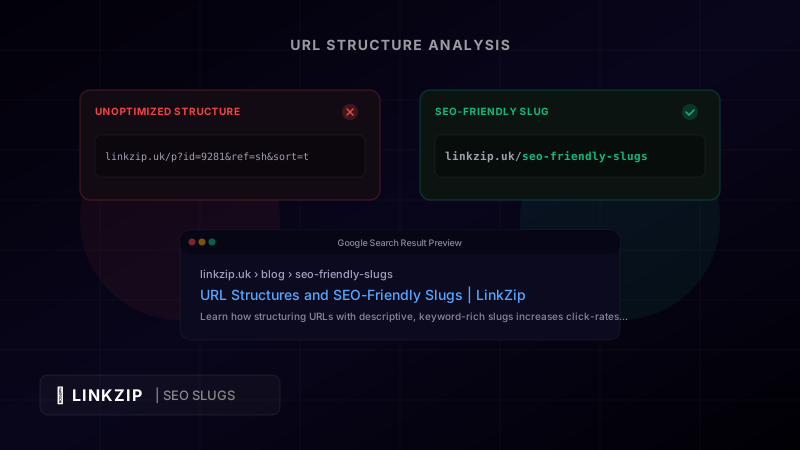
In search results, Google and other search engines display the breadcrumbs or the raw URL below the title tag. If a user sees a clean, descriptive URL like yoursite.com/blog/url-structures-seo-slugs, they are far more likely to click it than if they see a cryptic string of parameters like yoursite.com/index.php?p=38291&c=seo&sort=desc. A clean URL builds confidence and promises specific, relevant content.
3. Anchor Text Alternatives
When other websites or forums link back to your content, they often use the raw URL as the anchor text. If your URL is descriptive, it acts as natural anchor text containing your keywords (e.g., “Learn more at linkzip.uk/blog/seo-url-structures”). This is highly beneficial for building natural backlink profiles.
The Anatomy of an Optimized URL
To design an SEO-friendly URL, it is essential to understand the individual elements that make up the path. Each part plays a role in how a search engine understands your site architecture:
https://  yoursite.com  /  blog  /  seo-friendly-slugs
  ▲            ▲            ▲              ▲
Protocol Domain Folder/Category Slug- Protocol: Secure Socket Layer (SSL) encryption (
https://) is a confirmed Google ranking factor. Never run a website on insecurehttp://. - Domain: Keep your main domain short, clean, and representative of your brand.
- Folder/Category: Use a logical directory structure to group related content. For example, all articles should sit under
/blog/or/news/, and all products under/products/or/shop/. - Slug: The slug is the final, specific portion of the URL path that identifies the page. It must be unique, readable, and keyword-focused.
Best Practices for Crafting High-Performing Slugs
Creating optimized slugs requires a balance of brevity, clarity, and target keyword usage. Follow these industry-standard rules for every page you publish:
A. Keep It Short and Focused
Shorter URLs are easier to read, remember, and share. As a rule of thumb, keep your slugs between 3 and 5 words. Remove “stop words” (such as and, the, a, of, in, for) that add length without adding semantic value.
- Poor Slug:
/how-to-conduct-a-comprehensive-website-link-audit-for-beginners-in-2026 - Optimized Slug:
/website-link-audit
B. Use Target Keywords Intentionally
Identify the main search term you want the page to rank for, and place it at the beginning of the slug. Do not repeat keywords (keyword stuffing), as this looks spammy and can trigger search filters.
- Poor Slug:
/seo-tips-for-seo-link-building-with-seo-slugs - Optimized Slug:
/seo-link-building-tips
C. Standardize Lowercase Text
Web servers handle capitalization differently. While some servers are case-insensitive, others treat uppercase and lowercase letters as entirely separate URLs. Using capitalization can lead to duplicate content issues and 404 errors if a user types the URL manually. Always force lowercase.
D. Use Hyphens as Word Delimiters
Search engines recognize hyphens (-) as word separators, allowing them to read each word individually. Avoid using underscores (_), spaces, or special characters.
- Correct:
/url-structures-seo-slugs - Incorrect:
/url_structures_seo_slugsor/url structures seo slugs
Messy vs. Optimized URL Structures
Let’s compare how typical URL configurations look to search engine spiders and human searchers:
| Attribute | Messy / Unoptimized URL | Clean / SEO-Friendly URL |
|---|---|---|
| URL Example | site.com/c/p.html?id=231&ref=fb&track=1 | site.com/blog/url-structures-seo-slugs |
| Search Engine Readability | Low (hard to infer topic hierarchy) | High (immediately identifies category & topic) |
| User Trust & Click Rate | Low (looks suspicious or tracking heavy) | High (explicitly declares page contents) |
| Sharing Ease | Poor (long, ugly, easily truncated) | Excellent (fits on social cards & print) |
| Duplicate Content Risk | High (multiple parameters can load same page) | Low (canonical single path) |
For developers, rewriting dynamic URLs into clean paths is usually handled at the server level (such as using rewrite rules in .htaccess or middleware in next/astro apps):
// Example of clean slug routing middleware in a Node.js framework
// This maps dynamic parameter requests internally while exposing clean slugs
app.get('/blog/:slug', (req, res) => {
  const pageSlug = req.params.slug;
  // Fetch from database using clean slug search instead of numeric id
  const article = db.findArticleBySlug(pageSlug);
  if (!article) {
    return res.status(404).render('404');
  }
  res.render('blog-post', { article });
});
Preserving Link Equity with LinkZip.uk
One of the most dangerous moments in site management occurs when you restructure your website or rewrite existing URLs. If you change /old-page-name to /new-slug without proper redirection, you create two major problems:
- Broken Internal Links: Visitors clicking old internal links will hit a frustrating
404 Not Foundpage. - Loss of Backlink Authority (PageRank): Any external website linking to your old URL will now point to a dead end. The search authority that the page accumulated over months or years is instantly lost.
To prevent this, you must set up permanent 301 redirects. A 301 redirect tells search engines that the page has moved permanently, instructs them to index the new URL, and transfers 95% to 99% of the link equity from the old page to the new one.
LinkZip.uk makes managing redirects simple. Instead of editing complex configuration files on your server (which can lead to server crashes or redirect loops if misconfigured), you can manage all redirections from a centralized dashboard. LinkZip tracks every redirect hit, logs redirection latency, and ensures that your SEO transition is smooth and error-free.
URL Optimization Checklist
Ensure your website’s URL structure remains healthy by reviewing this audit checklist:
- Secure Protocol: Verify that all traffic redirects to
https://. - Lowercase Force: Ensure your server automatically converts uppercase URLs to lowercase to avoid duplicate pages.
- Hyphen Usage: Standardize the use of hyphens instead of underscores or spaces across all paths.
- Folder Structure: Limit folder nesting to 2 or 3 levels deep (e.g.,
/category/sub-category/slug). - Canonical Tags: Implement canonical tags to tell search engines which URL is the master version, preventing duplicate content flags for pages with tracking parameters.
- 301 Redirect Mapping: Create a redirect mapping sheet on LinkZip.uk before executing any site migrations or path changes.
Frequently Asked Questions (FAQ)
Can I change a URL slug after the page has been published and ranking?
Yes, but you should only do it if the existing URL is extremely poor or contains errors. If you must change a slug, you must set up a permanent 301 redirect from the old URL to the new one immediately to preserve search rankings and direct traffic safely.
Does having numbers in URL slugs hurt SEO?
No, numbers do not actively hurt your rankings. However, they are often redundant and make slugs harder to read. The exception is when numbers represent crucial facts (such as a year for annual guides, e.g., /seo-trends-2026).
Is it better to put blog posts under a /blog/ folder, or directly at the root level?
Grouping blog posts under /blog/ is generally better for structural organization. It allows you to analyze category-level search traffic easily in Google Analytics, configure site search parameters, and maintain a cleaner folder layout as your site grows.
Conclusion
By adopting a professional link management service like LinkZip.uk, content creators can gain complete visibility over their traffic, secure their commissions, and maintain brand consistency across all channels.
A clean, structured URL is a minor detail that delivers major benefits. By crafting short, keyword-focused slugs, avoiding messy query parameters, and utilizing LinkZip.uk to manage redirections, you establish an authoritative, trust-inducing, and highly crawlable website structure. Implementing these practices keeps search engine crawlers happy and gives your users the clear, professional browsing experience they expect. Take control of your URL architecture today to secure long-term search engine performance.