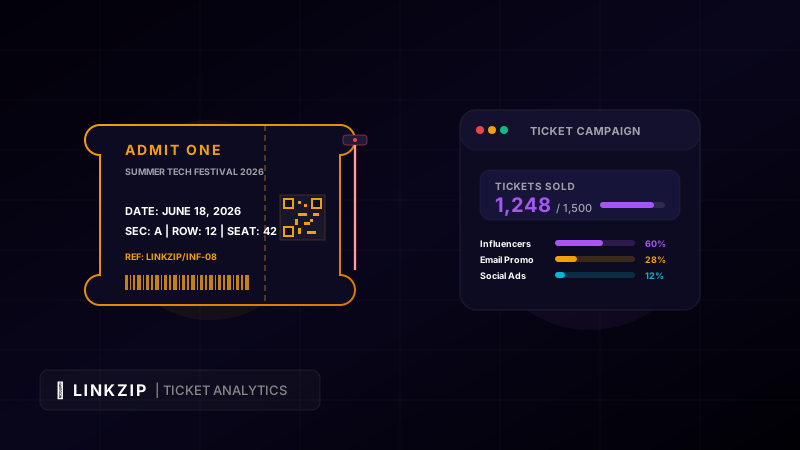
Organizing a successful event—whether it is a local business workshop, a large-scale music festival, or an international tech conference—is a complex, high-stakes project. Success is ultimately measured by one key metric: ticket sales.
Event organizers invest significant resources across various marketing channels, including paid social media ads, email newsletters, influencer partnerships, offline posters, and local press coverage. However, if you are using the same standard Eventbrite, Ticketmaster, or landing page link everywhere, you run into a major analytical problem. You cannot answer the most important question: Which marketing channels actually drove ticket purchases?
Without channel attribution, you are marketing in the dark. You might spend thousands of dollars on Instagram ads that generate high traffic but zero ticket sales, while a single influencer partner quietly drives 45% of your registrations. By utilizing custom trackable redirect links with LinkZip.uk, you can attribute every ticket purchase to its exact source, optimize your marketing budget in real-time, and run more successful events.
1. The Challenge of Ticket Sales Attribution
In marketing, attribution is the process of identifying which user touchpoint led to a desired action (in this case, buying an event ticket). For events, attribution is notoriously difficult because customers often interact with multiple channels before purchasing. They might see an event poster downtown, read a post on social media, receive an email invitation, and finally purchase a ticket after searching for the event on Google.
If you only track overall ticket sales, you cannot measure the Return on Investment (ROI) of individual campaigns. This can lead to several problems:
- Wasted Budget: Spending money on low-converting platforms.
- Influencer Disagreements: Being unable to verify which influencers or affiliates drove actual sales, making commission payouts difficult.
- Inaccurate Offline Data: Knowing that physical posters are being viewed, but having no way to track if they lead to online checkouts.
Using customized redirect links solves these problems by logging referral details the moment a user clicks, before redirecting them to the checkout page.
2. Setting Up a Trackable Link Strategy with LinkZip
To track sales across channels, you should create a unique trackable link for each campaign source.
Integrating UTM Parameters
UTM (Urgency Tracking Module) parameters are tags added to the end of a URL to help analytics programs track traffic source details. When combined with LinkZip, you can keep your outward-facing links short and professional while passing detailed UTM data behind the scenes.
For example, instead of sharing a long, messy link on Instagram, you can use a short link like linkzip.uk/fest-ig. When clicked, it will redirect to your ticketing page with all UTM parameters intact:
<!-- Example of a shortened LinkZip link that redirects to a long URL with UTM tags -->
<!-- Destination target containing source, medium, and campaign details: -->
<a href="https://yourticketingplatform.com/checkout?event_id=summer26&utm_source=instagram&utm_medium=social_organic&utm_campaign=ticket_promo_day9">
Get Tickets Now
</a>Creating Channel-Specific Short Links
Create unique LinkZip redirects for each promotional channel. This allows you to isolate and compare performance easily:
- Newsletter Link:
linkzip.uk/fest-newsredirecting to your ticket page. - Instagram Bio Link:
linkzip.uk/fest-igredirecting to your ticket page. - Paid Facebook Ad Link:
linkzip.uk/fest-fb-adsredirecting to your ticket page.
By checking the click volumes and conversion data for each alias in your LinkZip dashboard, you can see exactly which channel is performing best.
3. Offline Ticket Tracking with Dynamic QR Codes
For physical events, offline marketing (such as posters, flyers, banners, and t-shirts) is highly effective. However, typing a long URL from a physical poster into a phone browser is a friction-filled experience for users.
Dynamic QR codes bridge the gap between offline promotion and online tracking. A QR code allows users to scan and visit your ticketing page instantly.
Why Dynamic QR Codes Matter:
- Change Destinations Anytime: If you need to change your ticketing platform or update the event schedule, you can edit the destination URL in your LinkZip dashboard. The printed QR code remains the same, saving you from having to reprint marketing materials.
- Granular Scans Tracking: LinkZip records the time, device, and location of every scan.
- A/B Testing Locations: Print one QR code (
/fest-poster-north) for posters in the north side of town and another (/fest-poster-south) for the south side. You can then measure which geographic area shows the most interest.
4. Tracking Affiliate and Influencer Sales
Partnering with influencers, sponsors, and brand ambassadors is a great way to expand your event’s reach. To incentivize partners, you can offer them a commission on every ticket they sell.
Instead of relying on coupon codes (which users often forget to enter or find leaked on discount sites), you can assign each partner a unique branded LinkZip URL (e.g., linkzip.uk/dj-mike).
Advantages of Partner Links:
- Professional Branding: Partners get clean, branded links that match the event’s identity.
- Automated Tracking: LinkZip logs every click driven by a partner, which you can cross-reference with your ticketing platform’s checkout logs for accurate commission payouts.
- Performance Accountability: You can see which partners are actively driving traffic and sales, and which ones are underperforming.
Event Tracking Configuration Matrix
Use this matrix to structure your tracking links and QR codes for your next event campaign:
| Campaign Channel | Outward Link (Alias) | Destination Target URL | Medium | Offline QR? |
|---|---|---|---|---|
| Email Newsletter | linkzip.uk/june-newsletter | yoursite.com/tickets?utm_source=newsletter&utm_medium=email | Digital | No |
| Instagram Bio | linkzip.uk/summerfest-bio | yoursite.com/tickets?utm_source=instagram&utm_medium=bio | Digital | No |
| Print Poster (Metro) | linkzip.uk/poster-metro | yoursite.com/tickets?utm_source=print&utm_medium=poster-metro | Physical | Yes |
| Partner: DJ Mike | linkzip.uk/dj-mike | yoursite.com/tickets?utm_source=partner&utm_campaign=dj-mike | Digital | No |
| Paid Facebook Ads | linkzip.uk/fest-fb | yoursite.com/tickets?utm_source=facebook&utm_medium=paid-cpc | Digital | No |
5. Analyzing Performance Metrics to Optimize Sales
Once your campaigns are live, monitor your analytics to make data-driven decisions:
- Click-to-Purchase Conversion Rate: Compare LinkZip’s click data with your ticketing platform’s purchase logs. If a link gets 500 clicks but only 2 sales, there may be an issue with your ticket pricing or the mobile-friendliness of your checkout page.
- Real-Time Ad Spending: If you see your Google Ads link (
/fest-adwords) has a low conversion rate compared to your organic TikTok link (/fest-tiktok), you can pause the Google Ads campaign and reallocate that budget to TikTok. - Scan Times: Track when users scan physical posters. If scans peak during morning commute hours, focus your digital promotions during those same hours to capture users when they are active.
Pro Tip: Long, complicated links reduce user trust and lower click-through rates. Use a free link management tool like LinkZip.uk to clean up your links, customize your aliases, and track clicks in real-time.
Conclusion
Tracking event ticket sales does not have to be difficult. By using branded custom links, UTM parameter integration, and dynamic QR codes with LinkZip.uk, you can attribute every sale to its source, manage influencer promotions, and measure your marketing ROI. Take control of your event marketing, optimize your ad spend, and sell out your next event with ease.