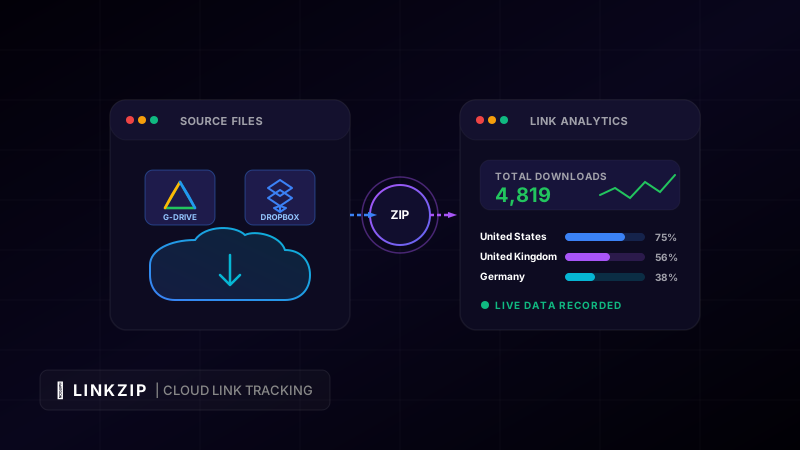
Cloud storage platforms like Google Drive and Dropbox have completely revolutionized how we share files. Whether you are a business owner sending a PDF proposal to a prospective client, a digital creator distributing a free resource to your email newsletter list, or an IT administrator sharing software installers with an entire team, the convenience of generating a sharing link is undeniable.
However, once you copy that link and paste it into an email, direct message, or web page, you lose almost all control. Raw cloud storage sharing links represent a massive analytical black hole. Traditional sharing settings let you set permissions (like view-only or editor access), but they fail to answer critical business questions:
- Did the recipient actually open the link and download the file?
- How many times was the document accessed?
- Is the link being shared with unauthorized third parties?
- What geographic regions or device types are accessing your files?
By using a branded, centralized redirection link with LinkZip.uk, you can turn static, raw cloud storage links into dynamic marketing assets. This guide explains how to configure Google Drive and Dropbox links for direct downloading, how to set up real-time tracking, and how to secure your files against unauthorized distribution.
1. The Core Issues with Raw Cloud Sharing Links
Before looking at the solution, it is important to understand why copy-pasting raw sharing links directly from your cloud storage provider is a bad practice.
A. Lack of Analytics and Tracking
Google Drive and Dropbox do not provide real-time click and download analytics for individual sharing links. You cannot tell if a specific client clicked your proposal link, or how many subscribers downloaded your new ebook. This lack of data makes it impossible to measure conversion rates or follow up with leads at the optimal time.
B. Long and Unprofessional URLs
Raw cloud URLs are long, complex, and intimidating. They expose folder structures and internal IDs, which can make users hesitant to click.
- Google Drive Raw Link:
https://docs.google.com/document/d/1A2B3C4D5E6F7G8H9I0J/edit?usp=sharing&ouid=123456&rtpof=true&sd=true - Dropbox Raw Link:
https://www.dropbox.com/scl/fi/abcdef123456/Document.docx?rlkey=xyz123&dl=0
These links clutter your emails and social media posts, detracting from your brand’s professionalism.
C. Link Inflexibility
If you discover a typo in a shared PDF, or if you need to update a pricing sheet, replacing the file in your cloud storage often generates a completely new sharing link. If you have already sent the original link in an email blast or printed it on marketing materials, you cannot change it. The old link will lead to outdated information, and you will have to send a second email apologizing and providing a new link.
2. Setting Up Direct Downloads for Google Drive and Dropbox
To track downloads effectively, you must configure your cloud links to initiate an immediate file download rather than directing the user to a preview web page.
How to Force Direct Downloads in Google Drive
By default, Google Drive links open the file in the Google Docs web viewer. To force a direct download, you must modify the URL structure. Replace the /file/d/[FILE_ID]/view?usp=sharing portion with /uc?export=download&id=[FILE_ID].
<!-- Example of transforming a Google Drive preview link to a direct download link -->
<!-- Original: https://drive.google.com/file/d/1XyZ987654321/view?usp=sharing -->
<!-- Direct Download: -->
<a href="https://drive.google.com/uc?export=download&id=1XyZ987654321">
Download File
</a>How to Force Direct Downloads in Dropbox
Dropbox sharing links end with dl=0, which opens the file in the Dropbox web preview. Changing the suffix from dl=0 to dl=1 forces the user’s browser to download the file directly.
<!-- Example of transforming a Dropbox preview link to a direct download link -->
<!-- Original: https://www.dropbox.com/s/abcdefg12345/guide.pdf?dl=0 -->
<!-- Direct Download: -->
<a href="https://www.dropbox.com/s/abcdefg12345/guide.pdf?dl=1">
  Download PDF
</a>
3. Wrapping Cloud Links with LinkZip.uk
Once you have your direct download URL, you can wrap it in a branded, trackable dynamic link using LinkZip.
Step-by-Step Configuration:
- Generate the Direct Download URL: Follow the formatting instructions above for Google Drive or Dropbox.
- Log in to LinkZip.uk: Open your LinkZip dashboard.
- Create a New Link: Paste your direct download URL into the destination field.
- Customize the Alias: Choose a memorable, branded alias (e.g.,
linkzip.uk/q2-reportinstead of a long string of random characters). - Save and Publish: Copy your new branded link and use it in your emails, landing pages, and social media posts.
4. Advanced Analytics: Measuring Asset Performance
By routing your cloud downloads through LinkZip, you unlock a powerful suite of real-time analytics that can help you optimize your content delivery:
- Conversion and Engagement Rates: Compare the number of people who visit your landing page with the number of unique clicks on your download link. If your landing page has 1,000 visitors but only 100 downloads, you may need to make your Call to Action (CTA) button more prominent.
- Geographic and Language Insights: See where your readers are located. If you notice a high volume of downloads from a specific non-English speaking country, you can prioritize translating your asset into that language.
- Device and Browser Context: Understand if your audience is reading your content on desktop or mobile. If 80% of your downloads occur on mobile devices, ensure your PDFs use a mobile-friendly, single-column layout with large, readable fonts.
- Time-of-Day Distribution: Identify the exact hours and days your links are most active. You can use this data to schedule future email campaigns or social media announcements for peak engagement times.
5. Securing and Managing Your Shared Files
LinkZip does more than just track clicks; it gives you ongoing control over your shared assets.
Dynamic Destination Updates
If you update a shared document (for example, updating a 2025 planning template for 2026), you can upload the new file to your cloud storage, copy the new sharing link, and update the destination in your LinkZip dashboard. The shortened link remains exactly the same, but it will immediately begin routing users to the new version of your file. You do not need to update your email sequences, website buttons, or social media bios.
Expiration Dates
If you are running a time-sensitive promotion or sharing a proposal that is only valid for 30 days, you can set an expiration date on your LinkZip link. Once the expiration date passes, users who click the link will be redirected to a custom page explaining that the offer has expired, protecting your time and resources.
Preventing Unauthorized Sharing
If you notice that a link meant for a single client is receiving hundreds of clicks from different IP addresses, you can pause the link in your dashboard instantly. This stops the download leak immediately, giving you time to investigate.
Download Tracking Checklist
Follow this quick checklist every time you share a file to ensure you capture clean analytics and protect your assets:
| Task | Action Required | Frequency | Target |
|---|---|---|---|
| Set Permissions | Ensure the source file is set to “Anyone with link can view/download” | Every File | Cloud Storage |
| Convert to Direct | Change the URL structure (using export=download or dl=1 parameters) | Every Link | Cloud Storage |
| Create Custom Alias | Design a short, branded redirect link in the LinkZip dashboard | Every Campaign | LinkZip |
| Set Expiry (Optional) | Define an expiration date for time-sensitive materials | As Needed | LinkZip |
| Monitor Traffic | Check the analytics dashboard to audit downloads and referral sources | Weekly | LinkZip |
Optimize Your Link CTR Today
Turn long, messy URLs into clean, branded, and trackable links in seconds with LinkZip. Boost your conversions and protect your brand.
Get Started FreeConclusion
Raw cloud storage links are convenient, but they leave you in the dark. By wrapping your Google Drive and Dropbox sharing links in branded, dynamic redirects with LinkZip.uk, you protect your deliverability, build professional credibility, and gain access to deep behavioral analytics. Take control of your shared files, track every download, and optimize your marketing funnel today.