In the physical-meets-digital world, Quick Response (QR) codes have become ubiquitous. From restaurant menus and concert tickets to marketing posters and product packaging, scanning a black-and-white grid has replaced typing long web addresses. But this ease of use has also caught the attention of cybercriminals.
Enter Quishing—a blend of “QR Code” and “Phishing.” This rising cybersecurity threat exploits the visual nature of QR codes to bypass traditional corporate security filters and trick unsuspecting users into visiting malicious websites.
For brands that utilize QR codes in their marketing campaigns and product lines, securing these gateways is critical to protecting customer trust and brand reputation. In this article, we explain the mechanics of quishing, why security filters fail to catch it, and how you can defend your audience using secure, dynamic redirection.
1. What is Quishing and How Does it Work?
Quishing is a social engineering attack where a malicious actor uses a QR code as the delivery mechanism for a phishing link. Instead of receiving a suspicious hyperlinked text in an email or message, the victim is presented with a QR code and urged to scan it with their smartphone camera.
The Attack Lifecycle:
- The Bait: An attacker sends an email, prints a physical flyer, or places a sticker over a legitimate QR code. The message usually carries high urgency, such as “Scan to verify your bank account,” “Scan to pay your parking fine,” or “Scan to authorize your Multi-Factor Authentication (MFA).”
- The Scan: The victim scans the QR code using their smartphone. Because mobile operating systems hide the full destination URL behind a small preview tag, the user cannot easily inspect the domain name for signs of phishing.
- The Redirect: The browser opens the destination page. Since the victim is browsing on their mobile device (which often lacks enterprise-grade firewall protection or security agents), they are routed directly to a credential harvesting page or a malware download node.
2. Why Traditional Security Filters Fail
Most corporate email servers and Secure Email Gateways (SEGs) are designed to scan incoming emails for known malicious hyperlinks, suspicious attachments, and bad domain names.
However, QR codes are images.
Traditional text-based security filters do not read images. An email containing a QR code looks like a harmless image of a graphic block, accompanied by standard text. While advanced email security tools now employ optical character recognition (OCR) and computer vision to extract URLs from QR codes, attackers constantly modify the image layout, adding noise or skewing the perspective to confuse OCR scanners.
By hiding the malicious link inside a graphic, attackers ensure their phishing emails slip past security gateways and land directly in user inboxes.
3. Real-World Quishing Vectors
Quishing is not limited to emails. It spans physical and digital environments:
- Multi-Factor Authentication (MFA) Phishing: Attackers send fake security alerts stating that the user’s password has expired or their account is locked. They present a QR code, claiming it is required to re-authenticate their MFA token. When scanned, it intercepts and steals the login credentials.
- Physical Sticker Tampering: Legitimate public QR codes (found on parking meters, city bike shares, or charging stations) are covered with malicious QR stickers printed by scammers. Users scanning the code believe they are paying the city, but their credit card details are captured by attackers.
- Malicious Invoices: Accounts payable departments receive PDF invoices containing a QR code to “expedite payment.” The scan redirects the employee to a payment portal that drains corporate funds.
4. Resolving QR Destinations Safely
To protect users, security systems must inspect QR destinations before redirecting. Here is a Node.js utility demonstrating how to programmatically scan and verify a URL target through a safe browsing check, resolving any intermediate redirects to find the final landing page:
// Node.js module to resolve redirects and inspect URLs for security
import fetch from 'node-fetch';

async function verifyQrDestination(shortUrl) {
  try {
    // Perform request and capture redirect hops
    // Note: We use & in code blocks to prevent HTML rendering bugs
    const response = await fetch(shortUrl, {
      method: 'GET',
      redirect: 'follow',
      headers: {
        'User-Agent': 'SecurityScanner/1.0',
        'Accept': 'text/html,application/xhtml+xml'
      }
    });

    const finalUrl = response.url;
    console.log(`Resolved destination: ${finalUrl}`);

    // Check against Safe Browsing API or local blacklist
    const isSafe = await checkSafeBrowsingApi(finalUrl);
    if (!isSafe) {
      console.warn(`[WARNING]: Malicious destination detected for ${shortUrl}`);
      return false;
    }

    return true;
  } catch (error) {
    console.error(`Error inspecting URL: ${error.message}`);
    return false;
  }
}

async function checkSafeBrowsingApi(urlToCheck) {
  // Mock check - replace with real Google Safe Browsing API calls
  const blacklistedDomains = ['malicious-phishing-site.com', 'steal-your-mfa.net'];
  return !blacklistedDomains.some(domain => urlToCheck.includes(domain));
}
By verifying the final destination programmatically, you prevent users from being routed to dangerous landing pages.
5. Traditional QR Codes vs. Secure Dynamic QR Codes
If your brand uses QR codes in marketing, print materials, or products, understand the security differences between static and dynamic QR routing:
| Feature | Static QR Codes | Secure Dynamic QR Codes (LinkZip) |
|---|---|---|
| URL Flexibility | Hardcoded destination. Cannot be changed once printed. | Update destination URL anytime without changing the QR image. |
| Abuse Protection | None. If target site is hacked, users get routed to malware. | Destructive links can be immediately disabled or rerouted. |
| Safety Integration | Direct redirect without security scans. | Automatically integrates Google Safe Browsing API checks. |
| Spam/Bot Filtering | No filters. Captures false scans from bots. | Filters out bot scans to maintain clean, accurate metrics. |
| Audience Trust | Raw, unbranded target domain displayed. | Uses branded domain routing (links.brand.com) for trust. |
6. How LinkZip Protects Against Quishing
Using a secure, dynamic link shortening service like LinkZip.uk to generate and manage your QR codes offers vital security benefits:
A. Real-Time Destination Verification
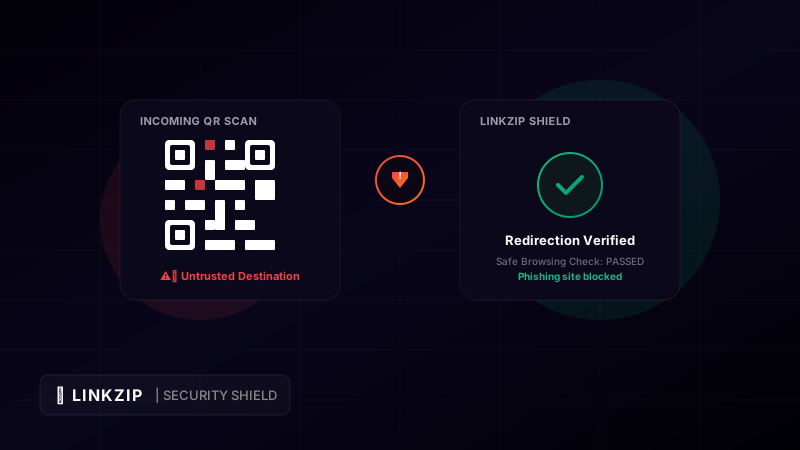
Whenever a user scans a LinkZip QR code, our edge routing system instantly checks the destination URL against the Google Safe Browsing API. If the target domain has been reported for phishing, hosting malware, or distributing spam, the redirect is stopped, and the user is shown a clear warning page.
B. Instant Target Modification
If a partner website you are linking to gets hacked or changes ownership, a printed static QR code becomes a major security liability. With LinkZip’s dynamic QR codes, you log into your dashboard, update the target URL in seconds, and ensure your printed materials continue to route users safely.
C. Branded, Recognizable Slugs
By using a clear, custom slug (e.g., linkzip.uk/promo) instead of a random string, your QR codes display a recognizable, on-brand URL in the smartphone camera preview instead of an opaque string. This reassures users they are interacting with a legitimate asset.
7. Frequently Asked Questions (FAQ)
Can a QR code automatically download malware to my phone?
Modern smartphone operating systems (iOS and Android) do not allow apps to install or files to execute automatically simply by scanning a QR code. However, scanning can trigger actions like launching your browser to a page that attempts to download a malicious profile, starting a phone call, drafting an email, or opening a payment app.
How can I spot a fake physical QR code?
Always inspect the physical material. Look closely to see if the QR code is printed directly on the poster, table, or meter, or if it is a sticker pasted over the original. If the sticker feels thick or looks misaligned, do not scan it.
Why should I use dynamic QR codes instead of static ones?
Dynamic QR codes allow you to change the destination URL after creation, track scanner analytics (device, location, and time), and apply active security verification layers to block phishing threats.
Create Dynamic QR Codes
Shorten your destination URL with LinkZip first to make your printed QR codes dynamic. Update your destination link anytime without reprinting.
Generate Dynamic LinksConclusion
QR codes are fantastic tools for linking physical spaces to digital experiences, but they require a security-first mindset. As quishing attacks increase, brands must protect their audiences. By using branded custom slugs, dynamic URL management, and real-time safe browsing sweeps through LinkZip.uk, you ensure that your QR campaigns remain engaging, effective, and completely secure.