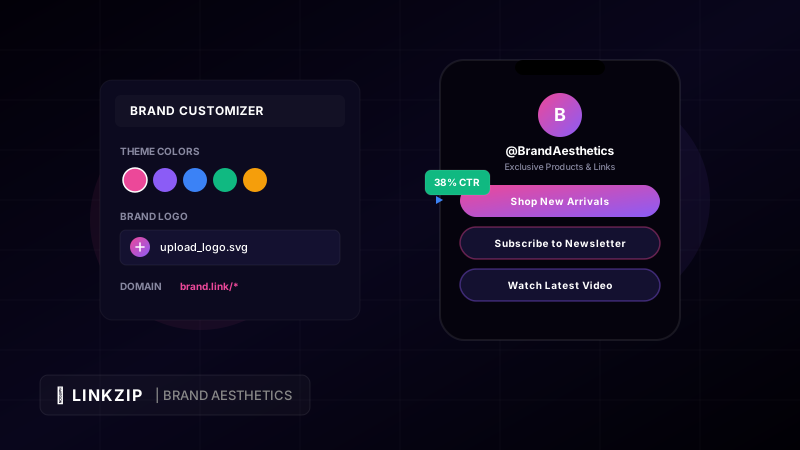
In the modern digital landscape, touchpoints between a business and its audience are fleeting. Brands invest millions of dollars in visual identity, crafting perfect logo marks, choosing harmonious color palettes, and refining typography to express their unique personality. Yet, when it comes to sharing links on social media, in newsletters, or on print materials, many companies resort to ugly, generic, or unbranded URLs like bit.ly/3xY8z9 or shrt.co/928fks.
This is a massive missed opportunity. A link is not merely a piece of technical infrastructure; it is an extension of your brand. When a user sees a link, they make an instantaneous decision: Do I trust this source, and does it look professional enough to click?
By transforming generic strings of text into custom, branded, and aesthetically pleasing URLs, you extend your brand’s design system directly into the browser’s address bar. In this comprehensive guide, we explore the science and art of link aesthetics, why branded links drive click-through rates (CTR), and how you can use LinkZip.uk’s custom slugs to build trustworthy, high-performing link assets.
Why Branded Links Drive Trust and Engagement
To understand why custom links matter, we have to look at the psychology of the modern web user. Users are constantly bombarded with spam, phishing attempts, and low-quality clickbait. A generic shortened link hides its destination, raising immediate red flags:
- Security Anxiety: Users are hesitant to click links when they cannot verify where they will land.
- Brand Disconnection: Every time you share a third-party domain, you are promoting their brand instead of your own.
- Poor Visual flow: Long, raw URLs with tracking parameters disrupt the layout of a clean social media post or bio page.
In contrast, a branded link—such as brand.link/summer-sale or myname.co/portfolio—gives immediate context. It signals ownership, reliability, and intent. Studies consistently show that branded links receive up to a 34% higher click-through rate (CTR) compared to generic shortened links. By matching the link to your brand’s visual style, you turn a passive URL into a call-to-action (CTA).
The Anatomy of an Aesthetic Link
Designing an aesthetic link requires a balance of structure, naming, and visual presentation. Let’s break down the three core components of an optimized URL:
https://  brand.link  /  join-us
  ▲           ▲             ▲
Protocol    Domain         Slug
1. The Protocol (Secure & Clean)
Always ensure your links use https:// to establish security. Browsers now actively warn users when redirecting through insecure protocols, which will instantly kill your traffic.
2. The Custom Domain (Your Brand)
Select a short, memorable custom domain that aligns with your primary brand name. If your company is Aura Skincare, a short domain like aura.link or auraskin.co works beautifully. This keeps your brand front and center.
3. The Slug (The Action Word)
The slug should be human-readable, lowercase, and hyphenated (if multiple words). Avoid underscores or random numbers. Use action-oriented verbs or clear noun phrases:
- Generic:
aura.link/p92 - Aesthetic & Action-Oriented:
aura.link/joinoraura.link/glow-serum
Visual Link Aesthetics in Bio Pages
One of the most popular uses of custom links is the “Link in Bio” landing page. This page acts as a digital business card, consolidating all your important resources into a single mobile-friendly destination.
Creating a premium, high-converting bio page requires strict adherence to design principles:
A. Color Harmony & Contrast
Avoid the default bright blues or generic neon buttons. Your link page should look like a natural extension of your main website. Choose HSL-tailored colors or sleek dark modes. If your brand utilizes pastel tones, use a soft background gradient (e.g., #fdfaf6 to #f7f0e8) with dark charcoal text for optimal readability.
B. Consistent Typography
Use modern, readable typefaces. Instead of default system fonts, fetch elegant typography (such as Outfit, Inter, or Montserrat) from Google Fonts. Keep font weights structured: bold for titles, medium/regular for buttons, and light for subtitles.
C. Glassmorphism & Hover Effects
Add micro-animations and interactive styles to make your page feel alive. Implement a glassmorphic background style with a semi-transparent white overlay, subtle borders, and blur filters. When users hover over or tap a link button, add a slight scaling effect or color transition:
/* Glassmorphism button style with subtle hover zoom */
.custom-link-btn {
  background: rgba(255, 255, 255, 0.05);
  backdrop-filter: blur(10px);
  border: 1px solid rgba(255, 255, 255, 0.1);
  border-radius: 16px;
  transition: transform 0.2s ease, border-color 0.2s ease;
}

.custom-link-btn:hover {
  transform: translateY(-2px);
  border-color: rgba(236, 72, 153, 0.4);
}
Step-by-Step Guide to Customizing Links with LinkZip.uk
LinkZip.uk makes designing a consistent slug system seamless. Here is how you can set up a cohesive link system for your brand:
Step 1: Define Your Slug Naming Conventions
Establish a style guide for your URLs. Consistency is key to aesthetic appeal.
- Use all-lowercase text.
- Use hyphens (
-) instead of spaces or underscores. - Use descriptive, evergreen slugs so the link remains relevant over time.
Step 2: Add Tracking Parameters Elegantly
When running marketing campaigns, tracking is essential. However, long query strings can look messy. With LinkZip, you can attach UTM parameters behind the scenes. The user only sees a clean URL:
<!-- The clean link shown to users -->
<a href="https://aura.link/glow-serum">Shop Serum</a>
<!-- The actual redirection handled by LinkZip behind the scenes -->
<!-- Note the escaped ampersands inside the href to prevent HTML errors -->
https://yourstore.com/products/glow-serum?utm_source=instagram&utm_medium=bio&utm_campaign=day10Branded Link Design Checklist
To ensure your links maintain visual excellence across all channels, refer to this checklist:
| Channel / Asset | Visual Design Standard | Goal |
|---|---|---|
| Social Media Bios | Short custom domain + clear CTA slug (yourbrand.link/signup) | Maximize click trust and CTR |
| Email Newsletters | Stylized HTML buttons matching brand brand primary colors | Create a clean visual hierarchy |
| Print Materials / Flyers | High-contrast, clean slugs without unnecessary directories | Easy manual typing for users |
| Link-in-Bio Pages | Glassmorphism card overlays + micro-interactive scale animations | Premium user experience & brand alignment |
| Ad Campaigns | Centralized redirection link with hidden UTM parameters | Clean URL display with rich background analytics |
Frequently Asked Questions (FAQ)
Can I use multiple branded slugs on a single LinkZip.uk account?
Yes. You can create as many custom-slug links as you need, which is ideal if you manage several distinct brands, products, or marketing campaigns.
Does a custom slug slow down the redirection speed?
Not at all. LinkZip uses a highly optimized global network to process redirects, and the redirect executes in milliseconds regardless of slug.
What is the benefit of using hyphens over underscores in URL slugs?
Search engines (especially Google) prefer hyphens because they treat them as spaces, which helps interpret the keywords within the URL. Underscores are treated as joined characters, making them less effective for SEO. Additionally, hyphens look cleaner and are easier for users to read.
Conclusion
By adopting a professional link management service like LinkZip.uk, content creators can gain complete visibility over their traffic, secure their commissions, and maintain brand consistency across all channels.
Aesthetic link customization is a subtle but powerful detail that separates professional brands from amateur ones. When every touchpoint counts, a clean, branded, and beautifully presented URL builds immediate trust, increases click-through rates, and reinforces your brand’s commitment to visual excellence. Start designing your custom brand slugs on LinkZip.uk today and elevate your digital presence.