In the fast-paced world of digital marketing, every touchpoint with your audience matters. From your social media bios and email campaigns to print advertisements and SMS alerts, the URLs you share are a direct extension of your brand identity. Yet, many businesses continue to overlook a critical element of their online presence: the link shortener.
For years, marketers relied on generic link shorteners. While these free services successfully shrunk long, unwieldy URLs, they introduced a major side effect—they stripped away the company’s brand, replacing it with a generic domain name. In an era where online security threats and spam are at an all-time high, generic short links have become a liability. They look suspicious, damage trust, and can even hurt your email deliverability.
The solution is custom domain shorteners and branded links. By routing your shortened URLs through a domain you own, you can transform anonymous links into powerful branding assets. In this comprehensive guide, we will explore the science behind branded links, their impact on click-through rates (CTR), and what to expect from a custom domain shortener setup.
1. What is a Custom Domain Shortener?
A custom domain shortener (often called a branded link shortener) is a tool that allows you to use your own domain name—such as go.yourbrand.com or yourbrand.link—to create short URLs instead of using a generic domain like bit.ly or tinyurl.com.
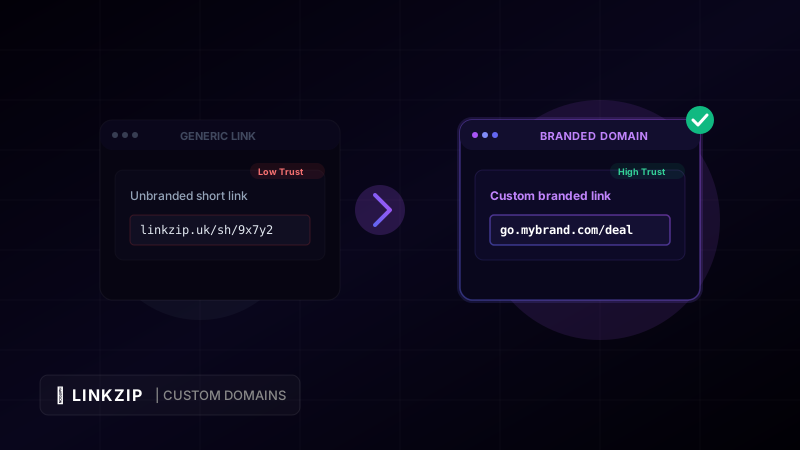
For example, consider the difference between these three links pointing to the same product landing page:
- The Raw URL:
https://www.example.com/shop/collections/summer-apparel/products/retro-sunglasses-classic?utm_source=twitter&utm_medium=social - The Generic Short Link:
https://linkzip.uk/sh/9x7y2 - The Branded Short Link:
https://go.example.com/retro-shades
The raw URL is far too long to share on character-constrained platforms like X (formerly Twitter) or in SMS marketing. The generic short link solves the length problem but hides the destination and identity of the creator, which can make users hesitate to click. The branded short link, however, is short, clean, tells the user exactly who is sharing it, and hints at the destination.
2. Why Branded Links Matter: Key Benefits
Switching from generic shorteners to a custom domain shortener offers several major business advantages:
A. Maximizing Audience Trust and Security
Internet users have become highly cautious. Phishing scams, malware, and spam often lurk behind generic short links because malicious actors use free shortening platforms to hide their destination URLs. When a user sees a generic short link, they have no way of knowing where it leads until they click it.
Branded links restore transparency. When users see your company’s name in the domain (e.g., brand.co/deal), they instantly associate the link with your business. This visual validation reassures them that the link is safe and legitimate, dramatically reducing the fear of clicking on malicious content.
B. Boosting Click-Through Rates (CTR)
Increased trust translates directly into higher engagement. According to industry studies, branded links can increase click-through rates by up to 34% compared to generic short links. By putting your brand name on the link, you make it more enticing and memorable. In competitive social media feeds, a branded URL stands out as a high-quality, professional asset rather than a spammy afterthought.
C. Creating Micro-Billboards for Your Brand
Every link you share is an opportunity to build brand awareness. When you use a generic shortener, you are advertising their service for free. When you use a custom domain, you keep your brand front and center. Even if a user does not immediately click the link, they still see your brand name, which aids in long-term brand recall and recognition.
D. Improving Email and SMS Deliverability
Spam filters on email providers (like Gmail and Outlook) and mobile carriers are highly sensitive to generic short domains. Because spam campaigns frequently utilize generic shorteners, domains like bit.ly or tiny.cc can find themselves on real-time blocklists (RBLs) or marked as high-risk. If your marketing emails or SMS campaigns contain these generic domains, they are much more likely to be sent straight to the spam folder.
Using a dedicated custom domain for your short links protects your sender reputation. Since your domain is only used by your organization, its reputation remains pristine, ensuring your messages reach your customers’ inboxes.
3. How to Choose the Perfect Short Domain
To get the most out of your branded links, you need to select a domain name that is optimized for shortening. Here are the best practices:
- Keep it Short: The primary purpose of shortening is to save space. Look for domain names with 2 to 6 characters.
- Use Creative TLDs: You do not need a
.comdomain for your shortener. Consider modern, shorter top-level domains (TLDs) such as.co,.link,.xyz,.click, or.to. - Make it Brand-Relevant: If your main website is
myawesomebrand.com, your short domain could bemyabr.coormab.link. - Establish a Subdomain: Alternatively, if you do not want to purchase a new domain, you can use a subdomain of your primary domain, such as
go.myawesomebrand.comorlinks.myawesomebrand.com.
4. Setting Up a Custom Domain (General Workflow)
Custom domains are not part of LinkZip’s current feature set — it is listed as a “Coming soon” item on our pricing page. The workflow below describes how domain mapping typically works on shorteners that do support it, so you know what to expect and how to evaluate one.
Here is a step-by-step technical guide to setting up a custom domain on a shortener that supports it:
Step 1: Access Your Domain Registrar’s DNS Settings
Log in to the account where you purchased your short domain (e.g., Namecheap, GoDaddy, Cloudflare, or Google Domains) and navigate to the DNS Zone Editor or DNS Management panel.
Step 2: Configure the DNS Records
Depending on whether you are using a root domain (e.g., brand.co) or a subdomain (e.g., go.brand.com), you will add a specific record:
| Domain Type | Record Type | Host / Name | Value / Destination |
|---|---|---|---|
Subdomain (go.brand.com) | CNAME | go | cname.yourshortener.com |
Root Domain (brand.co) | A | @ | 192.0.2.1 (Example IP) |
Note: For CNAME configurations, verify that Cloudflare proxying (if using Cloudflare) is turned off (DNS-only mode) during the initial verification.
Step 3: Add the Domain in Your Dashboard
Navigate to your provider’s domain settings, add the domain, and verify it. A proper implementation will automatically query the DNS records to confirm the mapping is correct.
Once verified, a good implementation will provision a free SSL certificate for your custom domain so that all your branded links are securely served over HTTPS, letting you create short links like go.brand.com/summer directly from your dashboard.
5. Coding Example: Generating Branded Links Programmatically
If you are running an e-commerce platform or a high-volume content site, you will want to generate branded links automatically. Here is how you can use the LinkZip REST API to create a branded link using Node.js:
const fetch = require('node-fetch');
async function createBrandedLink() {
const apiKey = ‘lz_live_abc123xyz789’;
const targetUrl = ‘https://www.example.com/products/classic-sunglasses?utm_source=newsletter&utm_medium=email&utm_campaign=summer_sale’;
const response = await fetch(‘https://api.linkzip.uk/v1/links’, {
method: ‘POST’,
headers: {
‘Authorization’: Bearer ${apiKey},
‘Content-Type’: ‘application/json’
},
body: JSON.stringify({
destination: targetUrl,
slug: ‘retro-shades’,
title: ‘Summer Sale - Classic Sunglasses’
})
});
const data = await response.json();
if (response.ok) {
console.log(Successfully created branded link: ${data.shortUrl});
} else {
console.error(‘Error creating link:’, data.message);
}
}
createBrandedLink();
[!IMPORTANT] Notice the use of
&in the target URL query parameters in the code example above. This ensures that ampersands are properly encoded, avoiding HTML syntax parser bugs in templated rendering engines.
6. Frequently Asked Questions (FAQ)
Does a custom domain slow down redirects?
No, not on a well-built shortener. LinkZip’s own links already run on a global Edge Network that processes redirects in under 50 milliseconds; a proper custom-domain implementation would route through the same infrastructure with no speed penalty.
Would I need to pay for an SSL certificate for my custom domain?
On a well-built shortener, no — certificate acquisition, renewal, and installation for verified custom domains should be automatic and included at no extra cost.
Can I change the destination of a branded link after it’s shared?
Yes! That is one of the key benefits of using LinkZip. If a product goes out of stock or you change landing page structures, you can update the destination URL inside your dashboard without changing the short link. The link shared on your marketing channels remains active and will redirect to the new page instantly.
Optimize Your Link CTR Today
Turn long, messy URLs into clean, branded, and trackable links in seconds with LinkZip. Boost your conversions and protect your brand.
Get Started FreeConclusion
Custom domain shorteners are no longer a luxury reserved for enterprise businesses; they are an essential requirement for any brand looking to establish a professional, trustworthy online identity. By replacing generic short links with branded domains, you protect your email sender reputation, secure your audience’s trust, and drive up to 34% more click-throughs on your digital campaigns.
Custom domain support is on LinkZip’s roadmap. Until it ships, you can still make every link you share work harder for your brand with a custom slug on linkzip.uk.