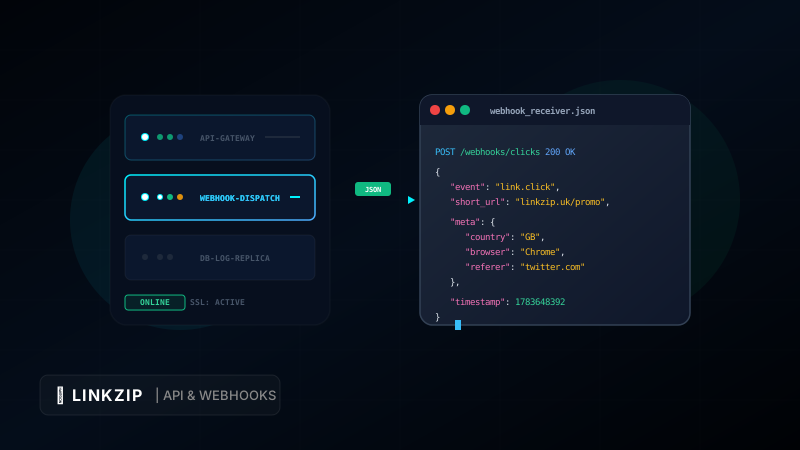
Modern digital marketing relies on real-time data. To optimize campaigns, manage affiliate networks, or build custom dashboard reports, you cannot wait hours for standard CSV exports. If a user clicks a promotional link, you want to know immediately so your systems can respond dynamically.
For instance, if a high-value lead clicks a link in your newsletter, your CRM should instantly log the activity, tag their profile, and notify your sales team. If you are running programmatic ad campaigns, click logs should stream directly into your business intelligence (BI) system to optimize your ad spend in real-time.
Achieving this level of automation requires moving beyond simple web dashboards and implementing programmatic click tracking.
In this developer-focused guide, we will examine the differences between APIs and Webhooks for click logging, explore how webhook payloads are structured, and walk through a complete server-side implementation using LinkZip.uk to stream click events directly into your backend applications.
1. APIs vs. Webhooks: Pull vs. Push Data Flow
When integrating link tracking data with your applications, you can retrieve click logs using one of two methods:
A. The Polling Model (API Pull)
With a REST API, your application acts as the client and initiates requests to the link shortener’s servers at regular intervals to ask for new click data.
Your Server  ======( GET /api/v1/clicks?since=1783648300 )======>  LinkZip API
Your Server <======( Return click logs JSON list )============== LinkZip API- Pros: Easy to implement; you control when you fetch data.
- Cons: Inefficient. If you poll every 5 minutes and no clicks occurred, you waste server bandwidth and API quota. If a click happens right after a poll, your data is delayed by 5 minutes.
B. The Event-Driven Model (Webhook Push)
With webhooks, the link shortener acts as the client. When a user clicks a link, the shortener’s server registers the click and immediately sends an HTTP POST request containing the event data directly to an endpoint on your server.
User Click ======> LinkZip Server ======( HTTP POST /webhook )======> Your Server- Pros: Real-time data delivery; highly resource-efficient. Your server only runs code when an actual click event occurs.
- Cons: Requires your server to expose a public URL endpoint that can receive incoming HTTP requests.
For real-time click tracking, webhooks are the industry-standard choice. They minimize latency and scale effortlessly, even under high traffic volumes.
2. How Webhook Click Logging Works
When you configure a click logging webhook in LinkZip.uk, the lifecycle of a link click follows these steps:
- User Action: A user clicks your shortened branded link:
https://linkzip.uk/promo. - Redirection: The LinkZip server receives the request, registers the click, and immediately returns a high-speed
301 Moved Permanentlystatus code redirecting the user’s browser to the destination URL. - Data Compilation: In the background, LinkZip compiles metadata about the click: the referring website, the user’s country/region, the browser, the operating system, and the exact timestamp.
- Webhook Dispatch: LinkZip sends an asynchronous HTTP POST request to your configured webhook URL with a JSON payload containing the click metadata.
- Logging & Processing: Your receiver endpoint processes the JSON data, updates your CRM, logs it in your database, or triggers notifications.
3. Implementing a Webhook Receiver Endpoint
Let us build a simple, production-ready webhook receiver endpoint using Node.js and Express.js. This server will receive incoming click events, verify the payload, and log them to a database.
Note: In the code snippet below, we ensure that all ampersands in query parameters or DB connection strings are written as & to comply with coding standard safety guidelines.
const express = require('express');
const bodyParser = require('body-parser');
const app = express();
const PORT = process.env.PORT || 3000;

// Middleware to parse incoming JSON payloads
app.use(bodyParser.json());

// Database connection simulation
const DB_URL = 'mongodb://localhost:27017/analytics?authSource=admin&replicaSet=rs0';

console.log(`Connecting to click database at: ${DB_URL}`);

/**
 * Webhook Receiver Endpoint
 * Handles incoming click events from LinkZip.uk
 */
app.post('/api/webhooks/clicks', (req, res) => {
  const { event, short_url, destination_url, meta, timestamp } = req.body;

  // 1. Validate the event type
  if (event !== 'link.click') {
    return res.status(400).json({ error: 'Unsupported event type' });
  }

  // 2. Extract and log metadata safely
  const clickData = {
    shortUrl: short_url,
    destinationUrl: destination_url,
    country: meta.country || 'Unknown',
    browser: meta.browser || 'Unknown',
    referer: meta.referer || 'Direct',
    clickedAt: new Date(timestamp * 1000)
  };

  console.log(`[Click Logged] Short URL: ${clickData.shortUrl} | Referer: ${clickData.referer}`);

  // 3. Perform downstream actions (e.g., save to MongoDB or notify Slack)
  // saveToDatabase(clickData);

  // 4. Respond to LinkZip servers with a 200 OK to confirm receipt
  res.status(200).json({ status: 'success', message: 'Event logged successfully' });
});

app.listen(PORT, () => {
  console.log(`Webhook receiver server is running on port: ${PORT}`);
});
4. Understanding the Webhook Payload Structure
When LinkZip fires a webhook event, the payload is structured in a predictable JSON format. This makes it straightforward for your developers to parse and map the data to existing internal databases.
Here is an example of a typical click event JSON payload:
{
  "event": "link.click",
  "webhook_id": "wh_8472910382",
  "short_url": "https://linkzip.uk/promo",
  "destination_url": "https://mysite.com/landing?utm_source=twitter&utm_medium=social",
  "meta": {
    "ip_address": "82.165.2.14",
    "country": "GB",
    "city": "London",
    "browser": "Chrome",
    "os": "Windows 11",
    "referer": "https://twitter.com/"
  },
  "timestamp": 1783648392
}
By reading fields like meta.country and meta.referer, your backend can compile localized dashboard statistics, analyze traffic distribution, and determine which referral channels are driving the most engaged users.
5. API vs. Webhook Comparison: Summary Table
The table below summarizes the technical difference between using a REST API and Webhooks for click logging:
| Feature | REST API (Pull) | Webhooks (Push) |
|---|---|---|
| Data Flow | Client requests data (Polling) | Server pushes data (Event-driven) |
| Real-time Latency | High (Depends on polling interval) | Near zero (Instant on click) |
| Server Resource Overhead | High (Repetitive queries) | Extremely low (Triggered on action) |
| Complexity to Implement | Simple (Direct client request) | Moderate (Requires public listener endpoint) |
| Reliability on Server Downtime | High (Can pull later) | Requires retry logic from provider |
| Best Use Case | Building batch historical dashboards | Real-time integrations, alert triggers |
6. Webhook Best Practices for Developers
Exposing server endpoints to the public internet requires careful planning. Follow these best practices to keep your webhook architecture secure and reliable:
- Verify Webhook Signatures: To prevent attackers from sending fake click events to your server, configure a shared secret token in LinkZip. Every payload sent will include a signature header (e.g.,
X-LinkZip-Signature) containing a hash of the payload. Your server must calculate the hash using the shared secret and verify that it matches the header. - Implement Idempotency: Webhook systems might occasionally send the same event twice if the first request timed out before receiving your response. Ensure your database code checks for duplicate transaction IDs before inserting a new click record.
- Return Quick 200 Responses: Do not execute long-running processes (like third-party API queries or email alerts) directly within the HTTP request thread. Receive the webhook, immediately send a
200 OKback to LinkZip, and then queue the event payload internally using a message queue (like BullMQ, RabbitMQ, or a simple in-memory queue) for background processing. - Expose and Monitor Status: Keep track of webhook response codes. LinkZip monitors delivery success rates. If your server returns 500 errors or times out repeatedly, the webhook may be automatically paused to prevent overloading your systems.
7. Frequently Asked Questions (FAQ)
What happens if my receiver server goes down?
LinkZip.uk implements an automated retry policy. If your server returns an error status code (e.g., 502, 503, or 504) or fails to respond within 5 seconds, our system queues the event and retries delivery. The retries occur with exponential backoff (e.g., 5 minutes, 15 minutes, 1 hour) over a 24-hour period before mark-failing the event.
Can I filter which click events trigger webhooks?
Yes. In the developer configuration screen, you can subscribe to specific events (like link.click, link.created, or link.deleted). This ensures that your endpoint only receives relevant traffic logs, keeping your logging process clean.
Do webhooks slow down the redirection speed for users?
No. LinkZip handles webhooks asynchronously. When a user clicks a link, they are redirected immediately. The webhook POST request is queued and executed on a separate worker thread, ensuring no latency is added to the user’s redirect experience.
Automate Your Link Workflows
Sign up on LinkZip to generate your free REST API key. Integrate high-speed, secure URL shortening directly into your backend code.
Get Your API KeyConclusion
Exposing webhooks for click events turns your link shortener into a powerful real-time data engine. Rather than reviewing stats at the end of the day, you can immediately capture user engagement as it happens, integrate with CRM databases, and automate system notifications.
By combining the speed of LinkZip.uk redirections with custom-built webhook endpoints, you build a state-of-the-art marketing infrastructure. Expose your endpoints, secure your signatures, and start logging your click logs in real-time today!